Tutorial 3: Chemical Property Extraction (Standard Enthalpy of Formation for Gases from the Excel Database)
In this tutorial you will learn how to Obtain Chemical Properties that are included in the Database.
Background Information / Code Overview:
This code will be calling to an excel document that contains currently a few hundred chemicals with property data including: Heat of Vaporization, Heat Capacity, Boiling Point, Melting Point, Viscosity, Standard Formation Enthalpy, Critical Pressure and Temperature, and Critical Molar Volume. With the code, you will be able to input a chemical name and Simplified Molecular Input Line Entry System (SMILES), the output will be some of the property data listed above. To suit a specific need, feel free to modify the code to display only certain properties or search for multiple chemicals at once.
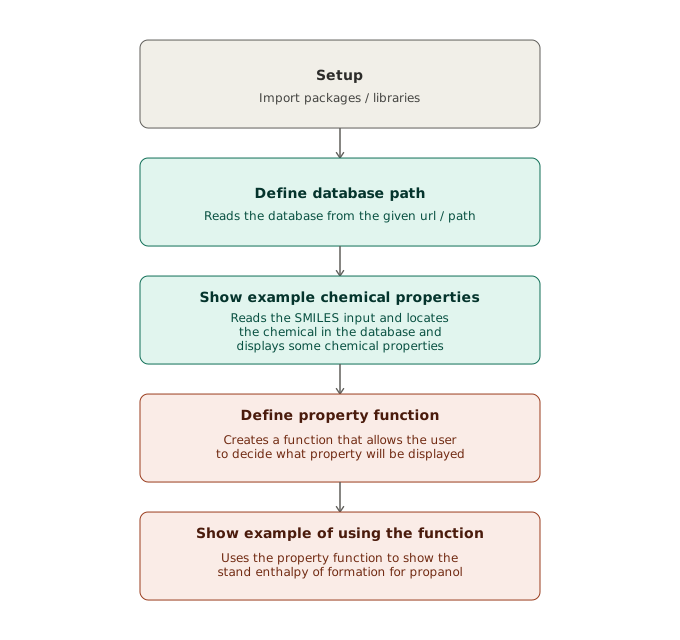
The libraries / packages listed in cell 1 will have a brief explanation of their function in the code, but for more information, please use the links below
| Library / Package | Link to Documentations |
|---|---|
| numpy | NumPy Documentation [8] |
| pandas | Pandas Documentation [9] |
Click the button below to open this code in Google Colab

Outputs Should Appear Like This:
# Cell 1: Import Required Libraries to Obtain Chemical Properties

import numpy as np    # Stores numbers in arrays and runs fast calculations on them
import pandas as pd   # Opens the data file as a table and find rows by their SMILES string
Cell 1 Purpose: Import required libraries to run codes in subsequent cells
# Cell 2: Define Location of Database (Located in Github Repository)

DATABASE_PATH = "https://raw.githubusercontent.com/cacherowan/CACHE-Rowan/main/Reference_Files/Chemical_Property_Database/Processed_Solvent_DF_v6_TEST.xlsx"
df = pd.read_excel(DATABASE_PATH)
Cell 2 Purpose: Defines path to database in the GitHub repository and defines a variable to read the database.
# Cell 3: Display Some Chemical Properties for Propanol

# 1. Example: Propanol
MOLECULE = "Propanol"
SMILES = "CCCO"

# 2. Read the DB:
db = pd.read_excel(DATABASE_PATH)
db = db.set_index('SMILES')
descriptors = db.loc[SMILES]

# Selected properties for Human Health Impact:
thermo_feat_HH   = ['Heat of Vaporization(J/mol)', 'Heat Capacity (kJ/kgC)', 'XLogP','Pitzer’s Acentric Factor [-]', 'Critical Temperature [K]']
mol_desc_feat_HH = ['Chi0n', 'HallKierAlpha', 'SMR_VSA7', 'VSA_EState6','NumValenceElectrons']

# Selected properties for Climate Change:
thermo_feat_CC   = ['Heat Capacity (kJ/kgC)', 'Boiling Point(K)', 'XLogP', 'Critical Temperature [K]', 'Critical Molar Volume [m3/mol]']
mol_desc_feat_CC = ['BertzCT', 'ExactMolWt', 'HallKierAlpha', 'PEOE_VSA6', 'NOCount']

# 3. Obtain the relevant properties:
descriptors_hh = descriptors.loc[thermo_feat_HH + mol_desc_feat_HH]
descriptors_cc = descriptors.loc[thermo_feat_CC + mol_desc_feat_CC]

# Display Some Properties
descriptors_cc
Expected output
                        CCCO
Heat Capacity (kJ/kgC)	2.346
Boiling Point(K)	370.35
XLogP	0.3
Critical Temperature [K]	537.0
Critical Molar Volume [m3/mol]	0.000218
BertzCT	5.245112
ExactMolWt	60.057515
HallKierAlpha	-0.04
PEOE_VSA6	6.923737
NOCount	1
dtype: object
Cell 3 Purpose: Split descriptors into climate change impact and human health impact, and then display properties of propanol.
# Cell 4: Show how to Display a Specific Property
# Note to see full list of included chemicals and properties, go to this link which downloads the database:
# https://raw.githubusercontent.com/cacherowan/CACHE-Rowan/main/Reference_Files/Chemical_Property_Database/Processed_Solvent_DF_v6.xlsx.xlsx

# Define Function to Obtain Standard Enthalpy of Formation
def obtain_Enthalpy_Of_Formation(MOLECULE, SMILES):
    """
    Find Properties of input Molecule using the ANN model and database.

    Parameters:
        MOLECULE (str): Name of the molecule (for display purposes).
        SMILES (str): SMILES string of the molecule to look up in the database.

    Returns:
        float: Predicted standard formation enthalpy in J/mol.
    """

    # 2. Read the DB:
    db = pd.read_excel(DATABASE_PATH)
    db = db.set_index('SMILES')
    descriptors = db.loc[SMILES]

    Enthalpy_Of_Formation = ['Standard Formation Enthalpy (Gas) [J/mol]'] #Change this variable's string definition to suit your needed property (**Case and Space Sensitive**)

    # Examples to try:
    # Standard Formation Enthalpy (Gas) [J/mol]
    # Boiling Point(K)

    Property = descriptors.loc[Enthalpy_Of_Formation]

    return Property
Cell 4 Purpose: Show how you can change which property from the database you want to display. Here, a function is being created to show the enthalpy of formation for a molecule.
# Cell 5: Example Function Call Above

Propanol_Enthalpy_Of_Formation = obtain_Enthalpy_Of_Formation("Propanol", "CCCO") # Change Chemical Name (Optional) and SMILES (Required)
print(Propanol_Enthalpy_Of_Formation)
Expected output
Standard Formation Enthalpy (Gas) [J/mol]   -256000.0
Name: CCCO, dtype: object
Cell 5 Purpose: Call the function created above in cell 4 to show the enthalpy of formation for propanol.
Discussion / Analysis
In this code, you call to an excel sheet which holds a few hundred chemicals and their properties. You are also given an outline which you can modify to get any property from any chemical listed in the database.